If TikTok is part of your marketing, your profile should do more than introduce you. It should give people a clear next step. That might be visiting your store, booking a service, reading your blog, joining your email list, or viewing your latest offer. The bio link is one of the smallest profile details, but it can have a direct impact on traffic and conversions.
Many users search for how to add link to TikTok bio because the option is not always obvious. TikTok may show different settings depending on your account type, location, follower count, and business verification status. That means one person may see the Website field immediately, while another has to switch account types first. This guide explains the steps clearly, shows what to do when the option is missing, and helps you choose a link that supports your goals.
Why Your TikTok Bio Link Matters
Your TikTok bio link gives viewers a direct path from interest to action. When someone watches your videos, checks your profile, and wants more, the link removes friction. Instead of asking them to search your name or type a long URL, you give them one tap.
This is especially important for creators, small businesses, coaches, ecommerce brands, musicians, freelancers, and local services. A strong bio link can send traffic to a product page, newsletter, portfolio, booking form, menu, campaign page, or link-in-bio landing page with several destinations.
Who Can Add a Clickable Link on TikTok
TikTok allows many users to add a website link, but access can depend on account settings. Business Accounts can usually add a website link from the profile editing area. Some personal accounts may need a follower threshold or may not see the option at all.
If your profile does not show a Website or Links option, switching to a Business Account is often the fastest fix. TikTok’s own guidance says website links are available for users with 1,000 followers or more, or for Registered Business Accounts in supported areas.
Quick Checklist Before Adding Your Link
- Update the TikTok app to the latest version.
- Confirm your account type in Settings and privacy.
- Choose one clean, mobile-friendly URL.
- Test the link before adding it to your profile.
- Use a landing page if you need to share multiple links.
- Make sure your bio explains why people should tap the link.
How to Add a Link to TikTok Bio Step by Step
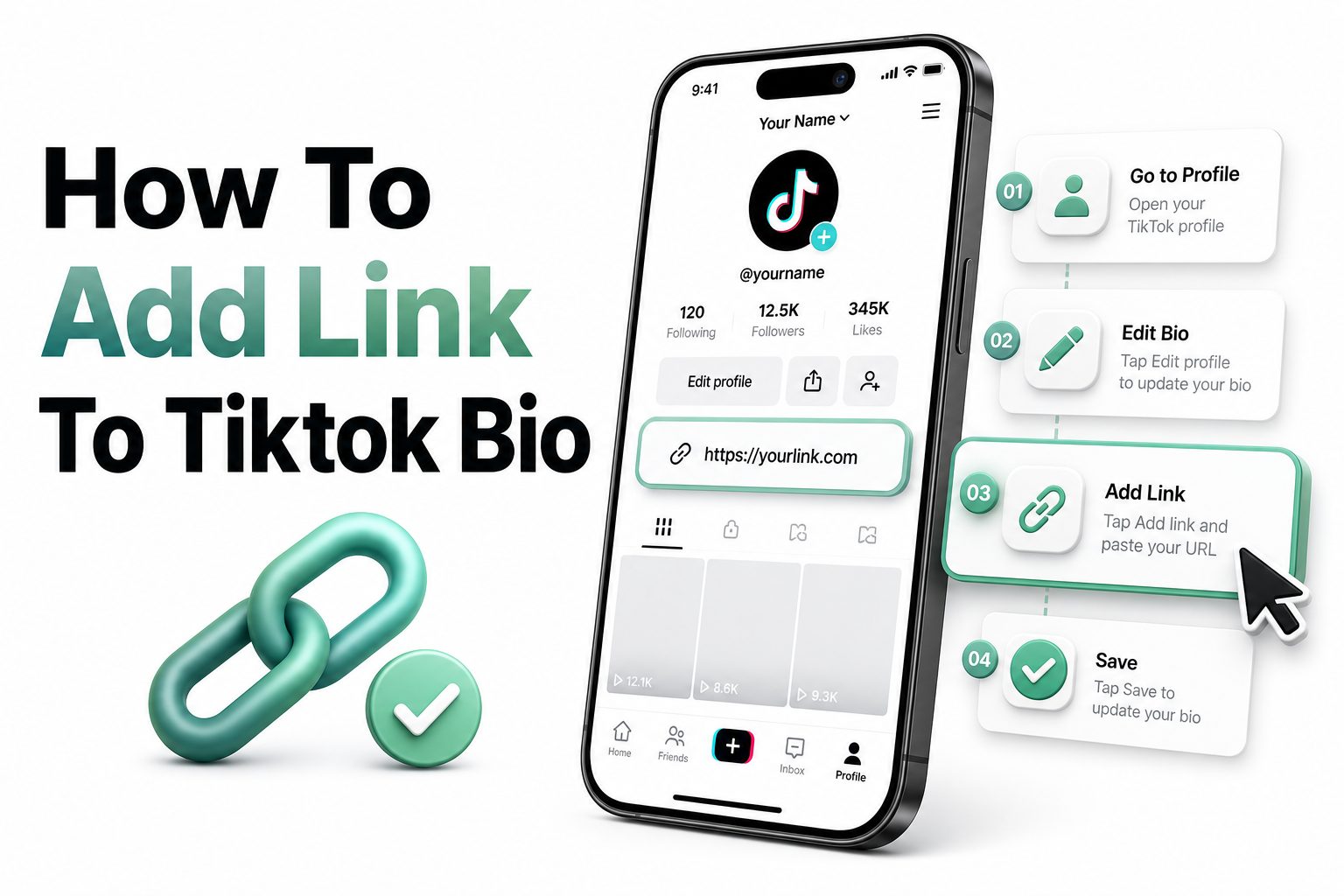
Open the TikTok app and tap Profile at the bottom of the screen. Tap Edit profile, then look for Links, Add, Website, or a similar field. Paste your URL, check that it is spelled correctly, then save your changes.
After saving, return to your public profile and tap the link yourself. This quick test matters because a broken link wastes profile traffic. If the link opens correctly on mobile and loads quickly, your TikTok profile is ready to send visitors outside the app.
How to Switch to a TikTok Business Account
If the link option is missing, tap Profile, open the menu, and go to Settings and privacy. Select Account, then choose Switch to Business Account. TikTok will ask you to choose a category that best describes your brand, niche, or business.
Once the switch is complete, go back to Edit profile and check for the website field again. Business Accounts also give you access to tools such as analytics and promotional features, which can help you measure how your profile content supports traffic.
Personal Account vs Business Account
Account Type | Best For | Bio Link Access | Main Trade-Off
Personal Account | General users and creators | May depend on eligibility | Fewer business tools
Business Account | Brands, shops, services, marketers | Usually supports website links | Some sound choices may be limited
Registered Business Account | Verified businesses | Stronger business profile features | Requires business registration steps
Creator-style use | Influencers and public figures | Availability may vary | Feature access can change by region
What to Do If the Website Field Is Missing
First, update your app and restart it. TikTok frequently changes interface labels, and older versions may not show the same profile options. Then check your account type, follower count, age settings, and region availability before assuming something is wrong.
If you still cannot add a clickable link, use your bio text strategically. Add a short, memorable domain, mention your Instagram or YouTube link, or direct users to search your brand name. It is not ideal, but it still gives motivated viewers a path.
Why TikTok Bio Link Access Can Vary
TikTok features are not always available to every user at the same time. Location, account age, business status, policy changes, testing groups, and account history can all affect what appears inside your settings. Two accounts may see different options on the same day.
This is why many tutorials look slightly different. One guide may mention Website, another may mention Links, and another may show Add next to social accounts. Focus on the intent of the step: profile editing is where TikTok places external link options.
Common Reasons the Link Option Is Missing
- Your account is still set as a Personal Account.
- Your app version is outdated.
- Your region does not support the feature yet.
- Your account does not meet follower or eligibility requirements.
- Your business account setup is incomplete.
- TikTok is testing a different profile layout.
- Your account has restrictions that limit profile features.
Best Link to Put in Your TikTok Bio
The best link depends on your goal. If you sell one product, link directly to that product. If you offer services, use a booking page or lead form. If you publish content, send visitors to your latest article, newsletter, podcast, or resource library.
For many accounts, a link-in-bio page works best because TikTok gives limited profile space. One landing page can include your shop, email signup, YouTube channel, blog, discount code, affiliate links, event registration, and contact page without changing your TikTok bio every day.
How to Add Multiple Links Through One Bio URL
TikTok usually gives you one main website field, so multiple links require a landing page. You can create one with your website, an ecommerce platform, or a link-in-bio tool. The page should be fast, clean, and easy to use on a phone.
Put your most important link first. TikTok visitors move quickly, so do not bury your main offer below too many buttons. Keep labels short, such as Shop New Arrivals, Book a Call, Read the Blog, Download the Guide, or Watch on YouTube.
Smart Bio Link Page Layout
- Primary offer at the top.
- Short button labels with action words.
- Mobile-first design with fast loading.
- Brand colors that match your TikTok profile.
- Contact or booking option when relevant.
- Tracking links for campaigns.
- Fresh links tied to recent videos.
How to Write a TikTok Bio That Supports Your Link
Your bio should tell people who you help and what they can do next. A link without context gets fewer taps because visitors are not sure what they will find. Use simple wording that connects your videos to the page you want people to visit.
For example, a fitness coach could write, “Strength plans for busy beginners. Start with the free 7-day routine below.” A handmade jewelry brand could write, “Small-batch silver pieces. New collection now live.” The bio creates the reason, and the link completes the action.
Examples of Strong TikTok Bio Link Uses
A food blogger can link to a recipe index after posting short cooking videos. A real estate agent can link to a home valuation form. A course creator can link to a free training. A salon can link to online booking and service prices.
The key is matching the link to what viewers already want. If your recent videos focus on a specific product, link to that product. If your content covers broad advice, a resource page may perform better than a homepage with too many choices.
Bio Link Examples by Goal
Goal | Best Link Choice | Example Call to Action
Sell products | Product or collection page | Shop the pieces from my videos
Book clients | Scheduling page | Book a free consult
Grow email list | Lead magnet landing page | Get the free checklist
Promote content | Blog or video hub | Read the full tutorial
Build authority | Portfolio or case studies | See recent client work
How to Make Your TikTok Bio Link More Clickable
A clickable link still needs a reason to earn attention. Mention the link in your videos when it naturally fits. You can say “The template is linked in my bio” or “I added the full list to my profile link” without sounding pushy.
Use pinned videos to support the same goal. A pinned video can explain your offer, show results, answer common objections, or introduce your best resource. When the pinned content and bio link work together, profile visitors know exactly where to tap.
Tracking TikTok Bio Link Performance
Tracking helps you see whether your link is doing real work. Use UTM parameters, analytics from your website, or reporting from your link-in-bio tool. Look at profile visits, link clicks, conversion rate, sales, bookings, and email signups.
Do not judge success by clicks alone. A link that gets fewer clicks but more purchases may be better than a link that attracts casual traffic. Compare different landing pages, button labels, offers, and video topics to see what creates useful action.
Simple Tracking Tips
- Add UTM tags to campaign URLs.
- Review TikTok profile views alongside link clicks.
- Track conversions, not only visits.
- Test one link change at a time.
- Compare traffic after viral and non-viral posts.
- Use short, readable URLs when possible.
- Check performance weekly, not every hour.
Mistakes to Avoid When Adding a TikTok Bio Link
The biggest mistake is linking to a slow or confusing page. TikTok traffic is mobile traffic, and users will leave quickly if the page loads poorly, hides the main action, or asks for too much information before giving value.
Another mistake is sending everyone to a generic homepage. Homepages often have many menus, banners, and competing messages. A focused landing page usually works better because it matches the reason someone came from TikTok in the first place.
How to Keep Your Link Safe and Trustworthy
Use a clean URL from your own domain when possible. People are more likely to tap a link that looks familiar, professional, and relevant. If you use a link-in-bio tool, choose one that loads securely and does not clutter the page with distracting branding.
Avoid misleading button labels, suspicious redirects, or pages filled with aggressive pop-ups. Trust matters on TikTok because users make quick decisions. A clear link, honest promise, and polished landing page can protect your credibility while improving results.
Important Safety Checks
- Use HTTPS for secure browsing.
- Avoid broken redirects.
- Keep pop-ups minimal on mobile.
- Match the link promise to the page content.
- Remove expired offers quickly.
- Test the link after every major website update.
- Keep your domain name easy to recognize.
How Often to Update Your TikTok Bio Link
Update your link whenever your main campaign changes. If you launch a product, promote an event, publish a major resource, or run a seasonal sale, your bio link should reflect that priority. TikTok content can move fast, so stale links cost opportunities.
At the same time, changing links too often can make tracking messy. If you post several videos around one campaign, keep the link stable long enough to measure results. For broader marketing planning, see [Internal Link: TikTok Marketing Strategy].
How to Use TikTok Bio Links for Business Growth
For businesses, the bio link should connect awareness to revenue. A viewer may find you through an entertaining or educational video, but your link should guide them toward a product, consultation, quote request, store visit, app download, or email signup.
Use the link as part of a simple funnel. TikTok brings attention, your profile builds trust, your bio explains the next step, and the landing page captures the action. For more on conversion-focused pages, read [Internal Link: Landing Page Optimization].
Bio Link Optimization Tips
- Keep your main offer above the fold.
- Use the same wording from your videos on your landing page.
- Remove links that do not support current goals.
- Make buttons large enough for mobile tapping.
- Add social proof when selling services or products.
- Use one clear call to action per campaign.
- Refresh the page before major promotions.
Conclusion
Adding a link to your TikTok bio is a small setup task, but it can shape how viewers move from watching your content to taking meaningful action. The process usually starts in Edit profile, where eligible accounts can add a website or link field. If the option is missing, switching to a Business Account, updating the app, or checking eligibility often solves the issue.
The real value comes from choosing the right destination. A strong TikTok bio link should match your content, load quickly, and give visitors a clear reason to act. Whether you send people to a store, booking page, newsletter, blog post, or link-in-bio page, keep the experience simple and relevant. When you know how to add link to TikTok bio and support it with a clear profile message, TikTok becomes more than a content platform. It becomes a reliable path to traffic, leads, and sales.
FAQ
Can everyone add a link to a TikTok bio?
Not always. Link access can depend on account type, location, follower count, and business status. If the Website field is missing, try switching to a Business Account and updating the TikTok app.
Where is the Website field on TikTok?
Open TikTok, tap Profile, then tap Edit profile. Look for Links, Add, or Website. TikTok may label this area differently depending on your account type, app version, and regional availability.
Can I add more than one TikTok bio link?
TikTok typically gives you one main website link. To share multiple destinations, use a link-in-bio landing page that includes your shop, booking page, newsletter, blog, social channels, and current offers.
Why is my TikTok bio link not clickable?
Your account may not be eligible, your profile may be set as a Personal Account, or the link may have been added only as plain bio text. Use the official Website or Links field when available.
What is the best link for a TikTok bio?
The best link matches your current goal. Use a product page for sales, a booking page for services, a signup page for email growth, or a link-in-bio page when you need several options.
0 Comments